Picocom APRS with Yaesu FTM-400XD
Yaesu FTM-400XD - APRS
Get the cable info
Plugged in the usb data connection cable that comes with the radio into a up-to-date raspberrypi 3.
Attempt to identify the devide in linux:

Since, I already know it’s a usb and the command lsusb returns the Prolific driver I expect, I can see how the device registered in the OS.
I then take the tty device returned and see if it has a serial number and what other capabilities / attributes the device or cable has. This can make it easier to name and identify later or if multiple similar devices are attached.

Picocom
Here is a screen shot of the process and the command used to start picocom:
picocom -b 9600 /dev/ttyUSB0
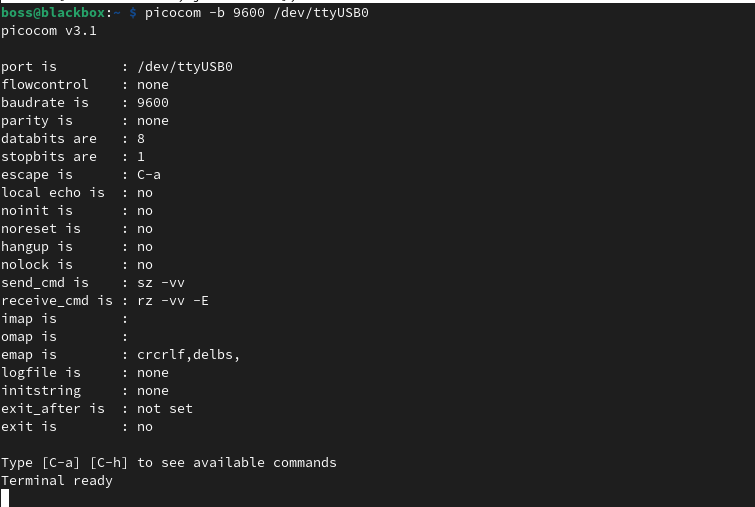
Here are more command line options and args that can be passed to the picocom command.
picocom v3.1

Compiled-in options:
  TTY_Q_SZ is 0
  HIGH_BAUD is enabled
  USE_FLOCK is enabled
  LINENOISE is enabled
  HISTFILE is: .picocom_history
  USE_CUSTOM_BAUD is enabled

Usage is: picocom [options] <tty port device>
Options are:
  --<b>aud <baudrate>
  --<f>low x (=soft,xon/xoff) | h (=hard) | n (=none)
  --parit<y> o (=odd) | e (=even) | n (=none)
  --<d>atabits 5 | 6 | 7 | 8
  --sto<p>bits 1 | 2
  --<e>scape <char>
  --<n>o-escape
  --e<c>ho
  --no<i>nit
  --no<r>eset
  --hang<u>p
  --no<l>ock
  --<s>end-cmd <command>
  --recei<v>e-cmd <command>
  --imap <map> (input mappings)
  --omap <map> (output mappings)
  --emap <map> (local-echo mappings)
  --lo<g>file <filename>
  --inits<t>ring <string>
  --e<x>it-after <msec>
  --e<X>it
  --lower-rts
  --raise-rts
  --lower-dtr
  --raise-dtr
  --<q>uiet
  --<h>elp
<map> is a comma-separated list of one or more of:
  crlf : map CR --> LF
  crcrlf : map CR --> CR + LF
  igncr : ignore CR
  lfcr : map LF --> CR
  lfcrlf : map LF --> CR + LF
  ignlf : ignore LF
  bsdel : map BS --> DEL
  delbs : map DEL --> BS
  spchex : map special chars (excl. CR, LF & TAB) --> hex
  tabhex : map TAB --> hex
  crhex : map CR --> hex
  lfhex : map LF --> hex
  8bithex : map 8-bit chars --> hex
  nrmhex : map normal ascii chars --> hex
<?> indicates the equivalent short option.
Short options are prefixed by "-" instead of by "--".
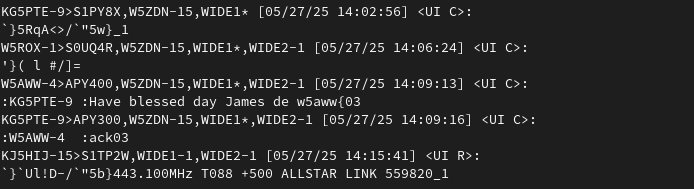
It’s not pretty, but it shows us APRS packets that my station has recieved and I can transmit from the radio. The output shows a direct APRS message I sent from the radio to KG5PTE and the ack03 reply that I got.